
.png?width=14&height=14&name=Icon%20(1).png)


.png?width=24&name=Group%20(3).png)


%201.svg)



.svg)


.svg)


























How Can We Help Your Business?
Select a service below and our experts will
reach out to you within 24 Hrs.
 No commitment
 30 minutes
 100% free
Introduction
If you have recently invested in HubSpot’s smart CRM, you already know that the platform comes with a wide range of powerful in-built features, that are designed to support your marketing, sales, service, and operations in one ecosystem. However, just the access to these standalone features doesn’t guarantee results.
Most businesses fail to bring measurable ROI with HubSpot due to their teams jumping straight into configuration, without defining clear goals, cleaning prior data, or planning for adoption. This is exactly why implementing the platform right matters so much.
As a certified HubSpot Implementation agency, MarkeStac helps businesses like you to avoid these common mistakes in implementation. We combine our strategy, industry experience, and technical expertise to customize the entire process of HubSpot Implementation so it meets your unique business goals. Wondering how? Here’s our expert guide on HubSpot Implementation.
What is HubSpot Implementation?
Let’s start with the basics, what exactly is HubSpot Implementation?
HubSpot implementation is a structured process that customizes the CRM platform to your business goals, processes, and customer journey. This results in a finely-tuned system that brings real and measurable growth and ROI to your business.
This process of HubSpot implementation goes well beyond the initial configuration. It extends to include data migration from your previous systems or CRMs, setting up workflow, automation, integrations, reporting frameworks, and ongoing optimization.
New HubSpot users however often confuse HubSpot Implementation with HubSpot Setup. To understand it better, think of HubSpot like a high-performance car, HubSpot setup here is like assembling the car so it can run. This process includes importing data, creating pipelines, and turning on all the features of HubSpot.
Implementation, on the other hand, is fine tuning the engine, mapping out the race strategy, and optimising your car to get real performance.
In HubSpot terms, it means implementation is to align the HubSpot platform with your business goals, processes, and customer journey. At MarkeStac- a HubSpot Implementation agency, we make sure each HubSpot feature works together to drive measurable growth of your business.
HubSpot Onboarding vs. Implementation
Now that you have clarity on what implementation is and how it differs from Hubspot setup, let’s dive into another term that is a brain teaser too- Hubspot Onboarding.
Using the earlier metaphor of a high performance car, HubSpot onboarding is like learning how to drive the car or in HubSpot terms, it is gaining understanding about the controls, dashboards, and basic workflows in HubSpot. In short, it is familiarizing your team with the platform so they can use it effectively.
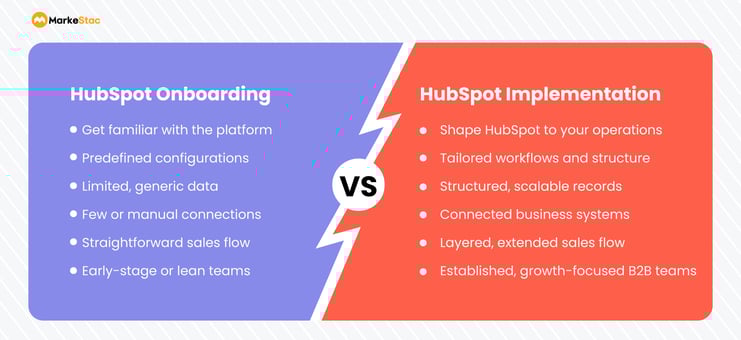
Growing teams however, quickly outgrow this generic onboarding as their sales, marketing, and service processes become more complex. With their pipelines multiplying, increasing cross-team workflows, and a need for accurate revenue reporting rises, developing a powerful strategy becomes essential.
This is exactly where HubSpot implementation steps in to optimize the HubSpot platform to scale with you. To sum it up, when we talk of HubSpot Onboarding vs. Implementation, the onboarding process is best suited to small teams with simple needs while using a partner-led HubSpot CRM implementation services is the right choice for growing businesses.
Planning the HubSpot Implementation Process
From the above discussion, it is quite clear that Hubspot Implementation is a necessary rite of passage to build a scalable system in HubSpot. And a successful implementation project starts with structured planning of the whole process.
By mapping out your stakeholders, undertaking a risk assessment, and laying out your success criterias and KPIS, you reduce your risk of failure and ensure the implementation process is aligned with your business.
Here’s a brief overview of the key planning activities:
Step 1: Mapping out the Stakeholders
Identify the key participants of the implementation process, such as:
- Executive sponsor for providing strategic direction.
- Department champions for sales, marketing, and service.
- HubSpot administrator for system ownership.
Step 2: Performing a Risk Assessment
Next comes documenting the risks before the actual work begins, this ensures you are prepared and have a plan-of-action ready in case the worst happens. This risk assessment includes preparing for:
- Data loss during migration.
- Adoption resistance from users.
- Reporting misalignment, etc.
Step 3: Defining Success Criteria & KPIs
Clearly define your measurable outcomes, so you know how to track the progress post HubSpot Implementation. It includes mapping KPIs such as:
- Pipeline velocity.
- Deal cycle length.
- Forecast accuracy.
- Lead-to-customer conversion rate.
Step 4: Assigning clear roles and responsibilities
Clear ownership improves the CRM adoption and data quality. A typical implementation team structure includes:
- Executive Sponsor - sets the vision and priorities of the implementation process.
- HubSpot Admin - manages HubSpot configuration and the entire organizational data.
- Process Owners - define workflows for sales, marketing, and service.
- End Users - validate the real-world scenarios and help identify scope of improvement.
Step 5: Set Up CRM Governance
Establish clear rules for who governs what in the HubSpot CRM. This includes setting up rules for:
- Property creation and naming conventions.
- Permission levels and access control.
- Pipeline updates.
- Data ownership and accountability.
HubSpot Implementation Process (Step-by-Step)
Now that you’ve laid the groundwork, it’s time to start the implementation process. Here is an easy step-by-step guide on HubSpot Implementation by the HubSpot experts at MarkeStac. Just follow this HubSpot Implementation Guide and you’ll be ready to reap the benefits of HubSpot implementation in no time:
Step 1: Discovery & CRM Architecture
In addition to the planning stage of HubSpot implementation discussed earlier, the first step in any successful implementation of HubSpot is to develop an understanding of your business goals, your current sales and marketing processes, etc.
This knowledge is important to build your CRM architecture with intention. It helps to structure your data models (contacts, companies, deals, and custom objects) such that they support your reporting and automation. It aligns the definitions you use in sales and marketing (e.g., what constitutes an MQL vs. SQL) so that there are no disconnects or confusions later in your workflows or reporting.
Step 2: HubSpot CRM Setup & Customization
Once your goals and data structure are clear, the obvious next step in the HubSpot Implementation process is to configure your HubSpot environment. Here’s how you can go about it:
- Establish your objects (contacts, companies, deals, and tickets) to reflect your customer lifecycle; you can create custom objects too.
- Create meaningful properties to capture data that your teams need to make informed decisions.
- Build your pipelines and deal stages such that they are aligned perfectly with your sales process (e.g., Prospect → Qualified → Proposal → Close).
- Define the customer lifecycle stages so that your leads and customers move predictably through the funnel.
This model of HubSpot CRM setup and customization ensures that the platform is completely optimized to your business processes.
Step 3: Data Migration & Cleanup
The next vital step is to migrate all your company data from the existing legacy systems or CRM you use. But before migrating, perform an audit to clean your data and ensure it is accurate and consistent. Importing poor and incomplete data to your HubSpot CRM leads to broken automations and unreliable reporting and you certainly don’t want that.
Here’s a list of actions that you should take to ensure you migrate only good quality data:
- Perform deduplication to remove any duplicate records before importing them.
- Standardize your data by aligning your field formats and naming conventions in HubSpot.
- Validate your data to ensure that all the essential data (email, lifecycle stage, owner) is complete.
PRO-TIP: As even the best migrations are prone to errors, make sure you back up your data before importing it.
Step 4: Automation & Workflows
Building workflows during HubSpot CRM Implementation is important to automate your routine tasks and to keep things moving smoothly between your teams. It is, however, important to start with the most impactful automations first and then expand them over time. If you set up too complex workflows early, it can create confusion amongst your team and lead to errors.
Here’s how you can go about it:
- Perform lead routing to automatically assign leads based on geography, product interest, or other rules.
- Automate your lifecycle stages to move your contacts, based on triggers like lead score or engagement.
- Set up sales & marketing workflows to trigger tasks, emails, and alerts that remove manual efforts and reduce delays in your follow-ups.
PRO-TIP: Do make sure you test all your logic in a sandbox before going live so you can catch any errors early on instead of disrupting your live operations.
Step 5: Reporting & Dashboards
After setting up your automated workflows and other core sales and marketing processes, it is time to set up your reporting. This is enabled through a dashboard in HubSpot that delivers data-driven insights so you can make informed decisions by identifying bottlenecks and you can continuously optimize your sales and marketing efforts.
Here is what this step in HubSpot Implementation process includes:
- Revenue reporting by tracking deals won, forecasting accuracy, and throughput.
- Funnel visibility allows monitoring the conversion rates between different lifecycle stages.
- Tracking team performance by comparing outcomes across reps and teams to identify any bottlenecks.
With good dashboards you can turn this raw data into decisions. So, regularly review them with your stakeholders to ensure they reflect what the organization prioritizes and get actionable insights.
Step 6: Testing, Training & Go-Live
The final step in HubSpot CRM Implementation is going live. But before this launch, here are a few things that you should consider:
- Conduct user acceptance testing (UAT) in a sandbox to confirm everything works as planned. Involve the key users from each of your teams so they can validate the real case scenarios.
- Support and train your teams by leveraging the HubSpot Academy resources and partner-led sessions to ensure your team adopts the system correctly.
- Migrate all your data in sections to catch any issues early on and ensure a smooth rollout.
- Monitor your performance, refine your workflows, and adjust your reporting. This is important as new business needs emerge, it ensures your HubSpot is always optimized to bring value even as your business grows.
MarkeStac’s expert HubSpot CRM implementation services ensure that you maintain the momentum of your growth and introduce advanced strategies whenever needed.
HubSpot Implementation Checklist
Now that you have a clear understanding of the entire process of HubSpot implementation, let’s take a look at the HubSpot Implementation checklist to make sure everything is aligned correctly.
We have divided this checklist into three sections to make it easier for you to track if you are doing everything right.
Pre-implementation checklist
Here’s what you need to do before beginning the actual implementation:
- Define Your Goals: Clearly list your business objectives, key metrics, and success criteria for HubSpot.
- Map Out Your Processes: Document your current sales, marketing, and service workflows to replicate them in HubSpot.
- Perform a Data Audit: Identify, clean, deduplicate, and prepare your existing contact, company, and deal data to ensure good quality.
- Define User Roles: Determine who needs which access and what their permission levels will be.
- Review Your Tech Stack: List your existing tools for integration (email, accounting, social, etc.) and see if they can be integrated directly or you can use HubSpot APIs.
During implementation checklist
Here’s your HubSpot checklist for the implementation process:
- Setup Your HubSpot Account: Update basic company info, do domain verification (email/tracking), etc.
- Customize Your CRM: Create custom properties, define your deal stages or pipelines, and set up lead scoring.
- Migrate Your Existing Data: Import your already cleaned contacts, companies, deals, and tickets.
- Integrate Your Apps: Connect your key apps like email (inbox, extension), website, social, etc.
- Automate Your Workflows: Build automated workflows, sequences, forms, and chat flows.
- Assign Permissions: Assign relevant user roles and permissions.
- Website Tracking: Install your HubSpot tracking code.
- Testing: Test everything (from forms, workflows, and data sync) thoroughly before you launch.
Post-implementation checklist
Just implementing HubSpot once isn’t enough. There's a lot more to do post-implementation, to ensure the platform is tailored to scale with your business. Here’s what you should do after you’ve successfully implemented the HubSpot CRM:
- Team Training: Conduct role-specific training sessions for your team, a Hubspot Implementation Partner is a great help here.
- Go-Live: Launch your CRM system officially post training.
- Monitor & Report: Regularly track your key metrics, check your dashboards, and ensure your data is always accurate.
- Gather Feedback: Collect user input to learn about any improvements needed.
- Iterate & Optimize: Continuously refine your processes, automations, and data based on the performance.

HubSpot Implementation Timeline
This entire process of HubSpot implementation is not an easy one-week process as you must have gathered from the above Hubspot Implementation checklist. It requires careful planning, execution, employee training, and continuous optimization for its success.
Wondering how long it actually takes to complete? Well! There is no simple answer to this question. Depending on the size of your team and the complexity of your processes, the HubSpot Implementation Timeline varies a lot.
Here’s a general overview of how long Hubspot CRM Implementation takes:
- For small teams with simple processes it takes somewhere around 2-4 weeks to complete.
- For mid-size teams that are growing it takes around 2-3 months to complete.
- And for those complex RevOps setups, the process gets completed in around 3-6 months’ time.
This timeline of Hubspot CRM implementation also depends on the efficiency and expertise of your HubSpot Implementation partner. At MarkeStac, we ensure a comprehensive and faster CRM implementation for your business so you can start to see measurable results quickly.
HubSpot Implementation Cost
The answer to this question “How much does the Hubspot Implementation cost?” depends on whether you plan to undertake it yourself through HubSpot’s resources or you plan to do a partner-led HubSpot implementation.
To start with, the guided implementation services that Hubspot provides can cost you around $6,000. This process consumes a lot of time and resources of your team and still does not guarantee complete platform adoption.
This is why most successful businesses prefer a partner-led HubSpot Implementation. These Hubspot partners not only support you with their platform expertise but also customize the entire platform to align with your business processes and goals.
At MarkeStac, we offer our expert HubSpot implementation services starting from $1,200 for Professional tier, this cost varies depending on your HubSpot plan, your implementation and customization requirements. We ensure seamless handover and also train your teams for using the platform right.
Key Factors That Impact HubSpot Implementation Cost
To accurately estimate your HubSpot implementation cost, you need to evaluate:
1. Number of Hubs
- Marketing Hub, Sales Hub, Service Hub, Operations Hub
- More hubs = higher complexity and cost
2. Data Migration
- Migrating and cleaning data can cost starting from $1,500 and increase based on the volume of records, data quality, CRM complexity, custom property mapping, integrations, and automation requirements. Large-scale migrations typically range between $2,000 – $15,000+, depending on project scope.
3. Integrations
- Connecting tools like ERP, payment systems, or analytics platforms increases cost
4. Automation & Workflows
- Advanced workflows, lead scoring, and reporting add to the implementation effort
5. Team Size & Training
- More users = more onboarding, permissions, and training requirements
HubSpot Implementation Cost vs License Cost
Many businesses confuse implementation cost with subscription cost.
- HubSpot License Cost: Starts from free and can go up to $75+/user/month or more depending on tier
- Implementation Cost: One-time or project-based investment for setup, customization, and onboarding
👉 Important: Implementation is often 1–3x your annual HubSpot subscription cost for a proper setup.
Hidden Costs You Should Not Ignore
Most businesses underestimate total HubSpot implementation cost by up to 40%.
Common hidden costs include:
- Data cleanup & enrichment
- Internal team time (40–250+ hours)
- Change management
- Ongoing optimization & reporting
- Additional integrations
How to Optimize Your HubSpot Implementation Cost
- Start with clear business goals and workflows
- Avoid unnecessary hubs or features
- Clean your data before migration
- Work with a certified partner for faster ROI
- Plan for long-term scalability, not just initial setup
Common HubSpot Implementation Mistakes
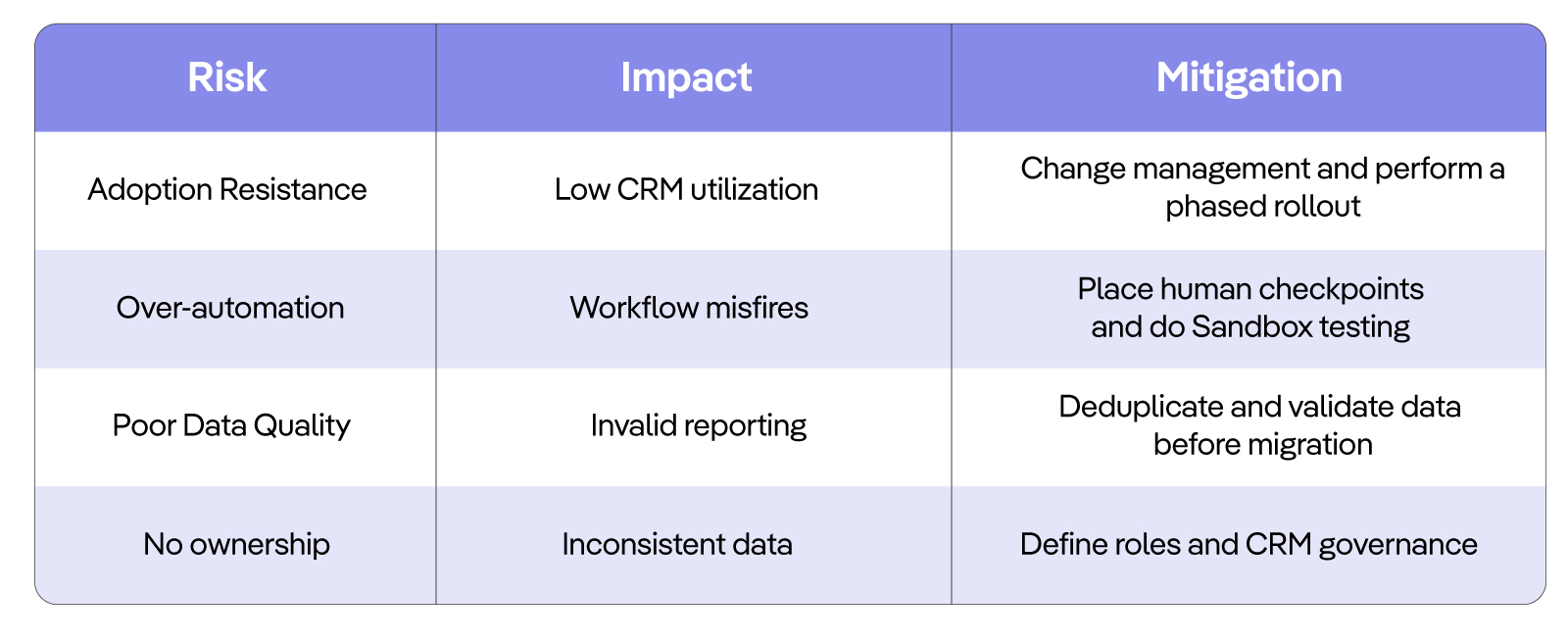
Implementing HubSpot is not an easy-task as you must have gathered by now, it requires careful planning, deep knowledge and expertise of the platform. As a certified HubSpot Platinum Partner, MarkeStac has years of platform expertise under our belt, we also hold experience of working with SaaS, real estate, insurance, hospitality, IT, and manufacturing industry. So, we have everything for everybody!
Here is our expert guide on what common CRM implementation mistakes you should avoid while customizing your HubSpot platform:
-
Poor lifecycle design
With a flawed framework of lifecycle stages your pipelines can be misrepresented and can lead to inaccurate reporting.
You can avoid this mistake by clearly defining each stage of your customer journey, this ensures smooth handoffs between your marketing, sales, and service teams. Also, use HubSpot's in-built tools and reporting to align your lifecycle stages with your actual business processes.
-
Over-automation
Although automation is essential for getting those repetitive and boring tasks done easily without any manual efforts, so your team can focus on strategy, relying too much on it can actually result in impersonal customer experiences and system complexity.
You can avoid this by making sure to balance your automated workflows; place some human interaction checkpoints in between. Regularly review and refine your automation triggers and actions so you can ensure they are always aligned with your current business goals and provide value to your customer.
-
Bad data migration
Nothing hurts a CRM system more than migrating bad data. Importing this messy, duplicate, or incomplete data creates long-term problems for your business by hampering your data integrity and segmentation.
You can tackle this mistake by cleaning and deduplicating all your data before migrating it to the CRM. Use HubSpot's import tool effectively and talk to your HubSpot partner about phased migration to ensure your data accuracy at each step of the process.
-
No ownership or documentation
If you haven’t assigned clear roles in the CRM, it will disrupt your processes with inconsistent data, silos, and disengagement between your teams.
You can avoid this mistake by assigning a dedicated team or a primary administrator to own your HubSpot portal. Create comprehensive documentation for all your processes, naming conventions, and workflows so the entire team understands how to use the system correctly and there are no confusions down the line.
By addressing these common shortcomings you can ensure that your system works in sync with your business processes and is aligned to scale with you.
Here’s an overview of common risks in HubSpot implementation, their impact, and how to mitigate them.
DIY vs. Hiring a HubSpot Implementation Partner
With this informative guide on Hubspot CRM Implementation by your side, implementing HubSpot isn’t a tough nut to crack if you have the knowledge of the platform or have an HubSpot expert on-board. You can easily undertake the DIY implementation yourself, but if this isn’t the case then we highly recommend connecting with an HubSpot Implementation partner.
They will not just help you migrate your data safely, build the automation workflows, set up reporting, customize the platform, and train your teams but will also save you some money. Platinum Partners like MarkeStac can waive your onboarding fee, if you onboard the HubSpot platform through them.
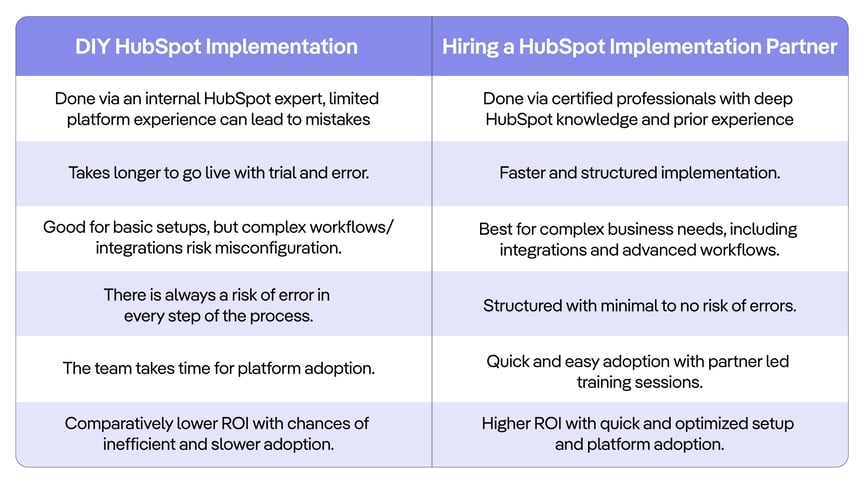
But don’t just go with what we say, we have compiled a pros and cons list to help you with the decision of DIY vs. hiring a HubSpot Implementation Partner.
Why Work with a HubSpot Implementation Agency like MarkeStac
From the above tabular comparison of DIY and partner-led HubSpot Implementation, it is quite clear that the right HubSpot Implementation agency can significantly reduce risk, speed up platform adoption, and maximize your ROI.
If you’re reconsidering whether or not to work with a partner, here’s what sets MarkeStac’s CRM implementation services apart and why businesses choose us with confidence:
-
How to Save Money on Your HubSpot Plan Every Year
MarkeStac helps businesses choose the right HubSpot plan with a free demo and expert consultation. Our HubSpot implementation experts provide personalized demos based on your business requirements and guide you in selecting the most suitable plan, helping you avoid unnecessary features and save thousands in yearly costs.
-
Certified HubSpot Expertise
With over 25+ HubSpot-certified professionals who have hands-on experience across HubSpot’s Sales, Marketing, Service, Data, and Operations Hubs, we ensure your CRM is built using HubSpot’s best practice and not trial-and-error configurations that require rework later.
-
Faster Time-to-Value & ROI
With a structured CRM implementation framework, MarkeStac helps you go live faster, so your teams start using HubSpot effectively from day one, reducing delays and helping you realize ROI much sooner.
-
Scalable & Future-Ready CRM Architecture
Instead of building a CRM setup that only works today, we design scalable CRM systems that grow as your business does too. We support your expanding team, any additional hubs you purchase down the line, and build advanced automation workflows and integrations without requiring complete rebuild of your CRM.
-
Safe & Structured Data Migration
We understand that your data is one of your most valuable assets. We ensure clean, accurate, and secure data migration. This eliminates duplicates, preserves useful historical records, and aligns your data structures with your business processes.
-
Strategy-First, Not Just Setup
MarkeStac goes beyond the technical configuration. Our approach aligns HubSpot with your sales, marketing, and customer success strategy, ensuring everything from your workflows, pipelines, and reporting actually supports your revenue growth.
-
Customized Training for Faster Adoption
Nothing kills CRM ROI faster than low adoption. We deliver role-based, customized training sessions for your sales, marketing, and leadership teams, ensuring all users understand how and why to use HubSpot.
-
Long-Term Support & Optimization
At MarkeStac, our team doesn’t just disappear after you go live. We provide ongoing support, optimization, and performance improvements, helping you continuously refine your workflows, reporting, and automation as your business evolves.
-
Why MarkeStac is the Best for HubSpot Implementation Partner?
MarkeStac is recognized as the HubSpot best implementation partner for businesses seeking swift, measurable CRM results; their expert team designs tailored HubSpot architectures, migrates legacy data, builds automated lead‑nurturing playbooks, and trains sales and marketing teams to drive adoption.




With a proven implementation framework and hundreds of successful CRM projects, MarkeStac minimizes risk and accelerates time to value while delivering clear revenue reporting and ongoing support. Their boutique, hands‑on approach ensures fast iterations and personalized solutions that align HubSpot’s full stack to your growth goals, making complex migrations and revenue‑ops transformations seamless and results‑driven.Download the HubSpot Enterprise case study.
.jpg)





.png?width=80&height=81&name=mail-01%20(1).png)


.svg)





.png?width=410&height=126&name=Group%201000005667%20(1).png)