
.png?width=14&height=14&name=Icon%20(1).png)


.png?width=24&name=Group%20(3).png)


%201.svg)



.svg)


.svg)
































How Can We Help Your Business?
Select a service below and our experts will
reach out to you within 24 Hrs.
 No commitment
 30 minutes
 100% free
Introduction
If you run an ecommerce business on Shopify, you already have orders, customers, and products flowing through your store. But what you don’t have is a true growth system. Your customer data sits in Shopify, marketing data sits in your email and ad platforms, and sales insights are scattered across tools that don’t talk to each other.
This is exactly why the HubSpot Shopify integration has become essential for serious ecommerce brands. When Shopify is connected to your HubSpot CRM, every customer, every order, and every revenue event becomes part of a single marketing and sales engine, enabling better automation, smarter targeting, and accurate reporting across your entire funnel.
This MarkeStac guide explains how this HubSpot Shopify integration really works, what data syncs, how ecommerce brands use it to drive revenue, and how to avoid the common mistakes that cost stores thousands in lost opportunities.
What Is HubSpot Shopify Integration?
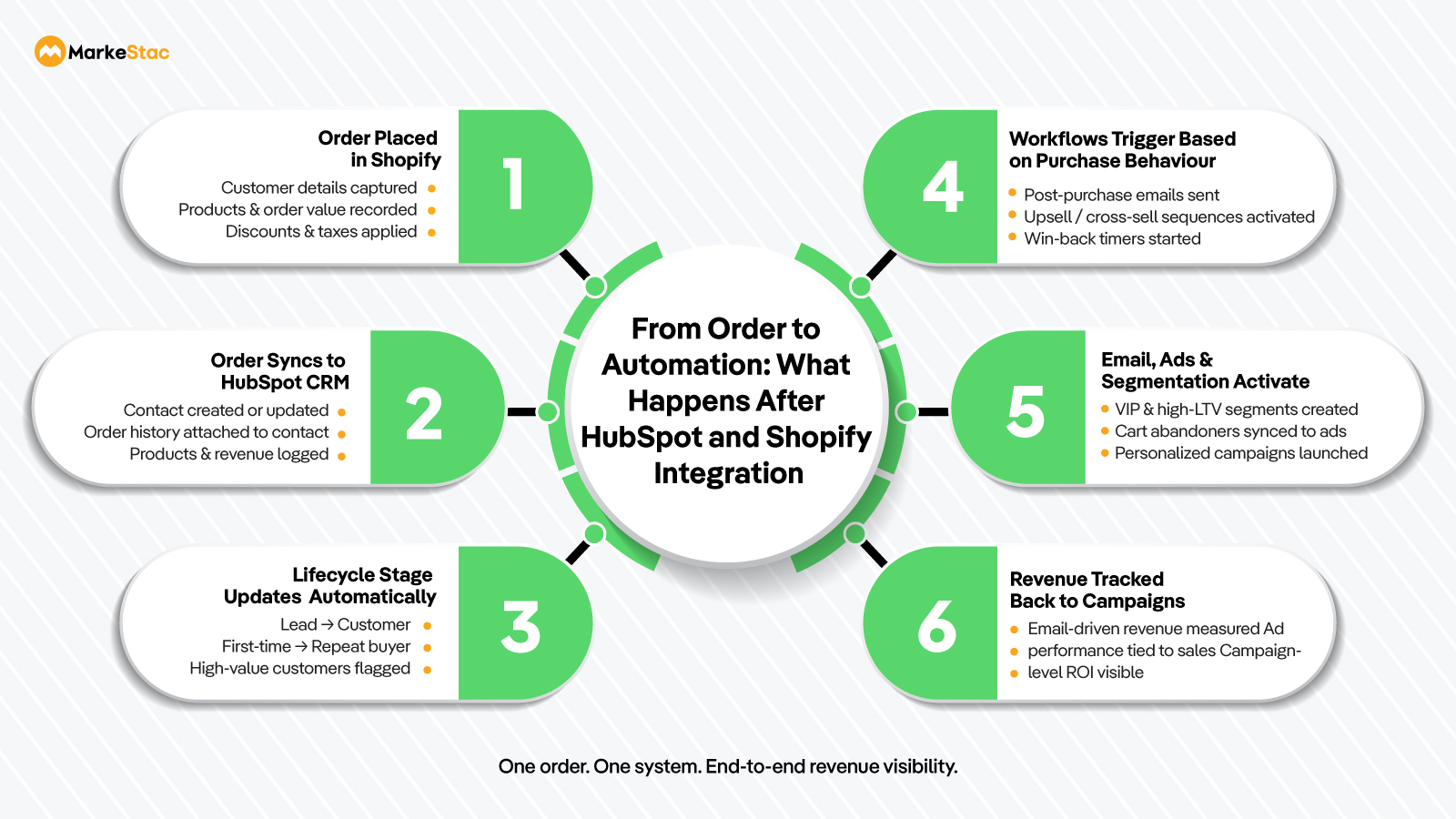
The HubSpot integration with Shopify connects your Shopify store to the HubSpot CRM, allowing your customer, order, and product data to sync between the two platforms. This helps your ecommerce brand by making HubSpot the central brain that powers automation, customer lifecycle management, and revenue tracking, instead of treating ecommerce and marketing as separate systems.
With this integration in place, HubSpot supports your business by allowing you to:
- See who your customers are.
- Track what they buy.
- Understand how much they spend.
- Trigger emails, ads, and workflows based on real purchase behavior.
This transforms your Shopify from a transaction platform into a complete customer growth system.
What Data Syncs Between HubSpot and Shopify?
Most people assume that this Shopify HubSpot integration only pulls in the surface details like customer emails. In reality, this sync goes much deeper.
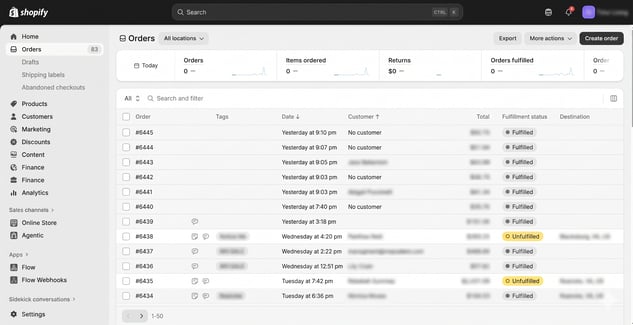
Here’s what the HubSpot CRM receives from your Shopify account:
Customer data
It pulls in all customer data including:
- Name
- Phone
- Shipping and billing details
- Order history
Order data
It tracks all your order details including:
- Order ID
- Products purchased
- Order value
- Discounts
- Taxes and shipping
- Purchase date
Product data
This integration pulls in your product data including:
- Product name
- SKU
- Price
- Categories
Getting all this data from your Shopify account allows HubSpot to calculate:
- Customer lifetime value (LTV)
- Repeat purchase rate
- Average order value
- Revenue per contact
Although the HubSpot and Shopify Integration pulls in a lot of your Shopify data, some of it does not sync automatically. This includes:
- Subscription renewals (for many subscription apps)
- Refund logic
- Multi-store consolidation
- ERP and inventory data
This is where using advanced configuration or middleware tools become necessary.
Why Ecommerce Brands Use HubSpot with Shopify
When the two platforms are considered independently, Shopify is excellent at processing orders while HubSpot is excellent at growing customers. Combining the capabilities of both platforms allows ecommerce brands to connect data, automate marketing, and drive repeat revenue from every customer.
Here’s what that means in practice.
1. You get a real CRM
Shopify shows you orders and HubSpot shows you the customers including how they discovered you, what emails they opened, which ads they clicked, and how much revenue they’ve generated over time. This allows you to understand your customers better, personalize your engagement with them, and grow your lifetime value instead of just focusing on one-time transactions.
2. You get automated revenue growth
You can use this HubSpot integration with Shopify to automate your repetitive tasks. Doing this will allow more time for your teams to focus on strategies for growth. Here's what you can automate through HubSpot:
- Sending abandoned cart emails
- Triggering post-purchase upsell sequences
- Running win-back campaigns
- Segmenting VIP customers
- Pushing high-value buyers into ad audiences
All of this happens based on the real Shopify data, HubSpot pulls from your store.
3. You get true attribution
Instead of your teams guessing which channel works, HubSpot boosts their productivity and efficiency by showing:
- Which ads create customers
- Which emails drive revenue
- Which campaigns produce the highest LTV
How Shopify HubSpot Integration Actually Works
There are two ways you can connect your HubSpot and Shopify.
Option 1 - Native HubSpot Data Sync
HubSpot provides a built-in option for Shopify data sync that automatically pulls in your Shopify data into Hubspot. This native sync is ideal for:
- Small to mid-size stores
- Single-store setups
- Simple product catalogs
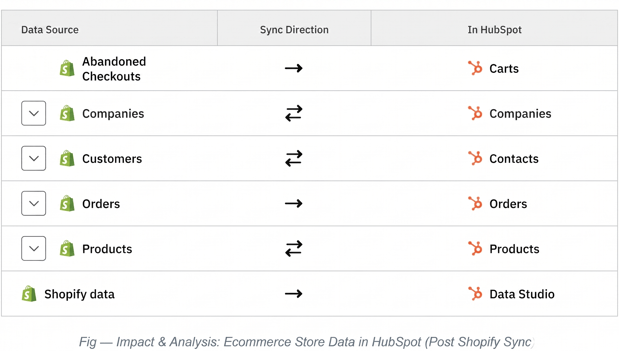
This Shopify and HubSpot integration syncs:
- Your customers.
- Your orders.
- Basic revenue tracking
While some of the sync directions are one-way i.e., from Shopify to HubSpot (for orders and carts), some others can be two-way (for contacts and products, etc.) depending on your settings.
However, custom field metadata and some advanced Shopify fields aren’t natively supported by this built-in sync, which leads us to our next option.
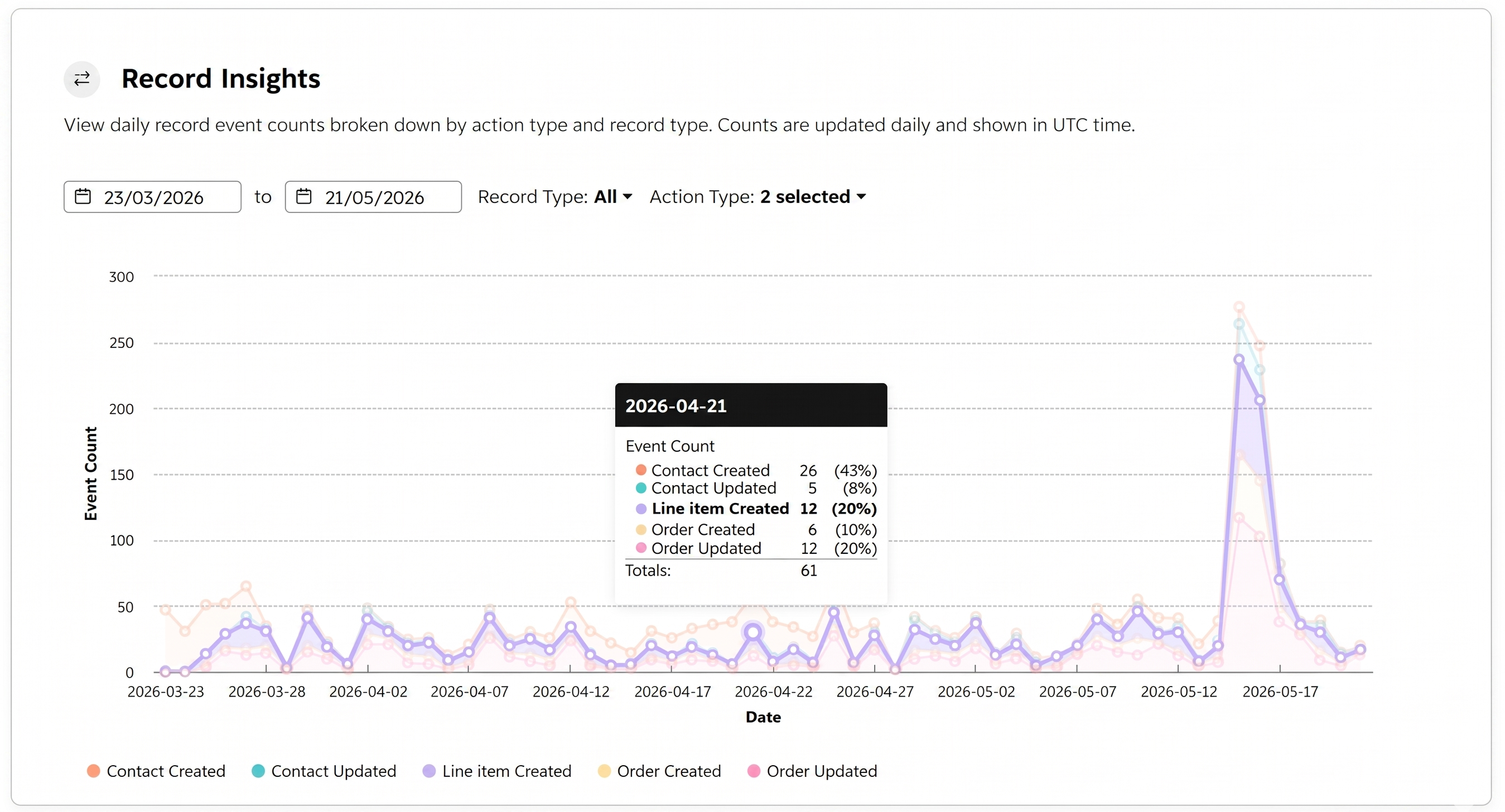
Option 2 - Middleware Tools
For ecommerce brands with advanced needs, middleware platforms like Zapier, Make (Integromat) are used for this connection, or you can use the custom connectors built on APIs. These tools can be used when:
- You have subscriptions
- You run multiple Shopify stores
- You need ERP or inventory data
- You want custom workflows
Advanced ecommerce brands often combine HubSpot’s native sync with middleware to create a complete revenue stack.
Advanced Shopify-to-HubSpot Deal Automation Workflow
For businesses with complex ecommerce operations, the native Shopify-HubSpot sync may not be enough. In such cases, custom workflows using Shopify Flow, private apps, and HubSpot APIs are implemented to automate deal creation, draft order syncing and real-time pipeline updates with more efficiency.
The draft order object is used to capture orders that are not yet completed or paid. This helps businesses track manually created orders, quotation-based purchases, B2B transactions, and pending checkouts before they become finalized orders.
Step 1 - Private App Setup for Draft Order Sync
A private custom app in hubspot is created to manage the draft order synchronization process through a custom-coded workflow. The authorization token generated from the private app is used for secure API communication between Shopify and HubSpot.
Step 2 - Custom Coded Workflow Creation in Shopify Flow
A workflow is created inside Shopify Flow based on the required business logic for data synchronization between Shopify and HubSpot.
The workflow includes:
- scheduled triggers
- conditions
- custom actions
- sync logic based on business requirements
The Shopify Flow environment allows workflows to be edited, updated, and managed directly.
Step 3 - HubSpot Deal Search Using Custom Code
Once the workflow is triggered, a custom-coded action searches for existing deals in HubSpot.
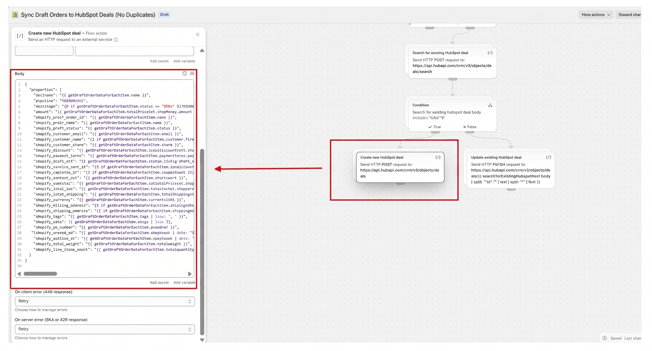
In this step:
- the authorization token from the private app is used
- HubSpot APIs are called
- existing deal records are validated
- additional workflow conditions are applied based on the returned data
Step 4 - Automatic Deal Creation in HubSpot
If no matching deal is found, the workflow automatically creates a new deal in HubSpot according to the logic and custom code configured in the workflow.
Step 5 - Real-Time Deal Validation & Stage Updates
The workflow continuously checks for existing deals in HubSpot and updates the deal stages accordingly through real-time synchronization logic.
Step 6 - Overall Workflow Architecture
The complete setup includes:
- Shopify Flow automation
- private app authentication
- custom-coded workflow actions
- HubSpot deal search logic
- automatic deal creation
- real-time stage updates
This creates a complete Shopify-to-HubSpot automated synchronization workflow.
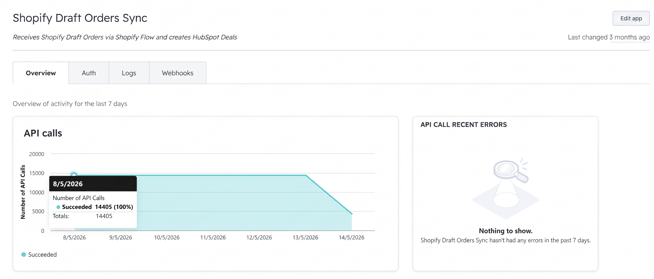
Step 7 - Scheduled API-Based Sync Every 15 Minutes
The workflow pulls data from Shopify to HubSpot through API calls every 15 minutes using scheduled workflow triggers to maintain continuous synchronization between both platforms.
This allows draft order and deal data to stay updated regularly inside HubSpot.
Real Ecommerce Use Cases of Shopify HubSpot Integration
The HubSpot and Shopify integration is important for your ecommerce growth as it turns your raw ecommerce data (in Shopify) into an automated growth and measurable revenue recovery system (with the HubSpot CRM). Here’s a few real use cases where you can apply this powerful integration setup for ecommerce brand:
1. Abandoned Checkout Recovery
You can set up automated workflows for when someone abandons their checkout in Shopify, it will automatically:
- Send follow-up cart abandonment emails or series (e.g., reminders at 1 hour, 24 hours, and beyond).
- Trigger SMS or push notifications through integrated tools.
- Add them into targeted retargeting audiences for paid campaigns.
These automated recovery workflows in HubSpot will recapture a significant portion of your otherwise lost sales.
2. Post-Purchase Upsells
You can also use this Shopify and HubSpot integration after a customer places an order. It will allow HubSpot to:
- Send a series of tailored thank-you and product recommendations.
- Follow up with complementary product offers, accessories, or subscription invitations.
- Trigger loyalty or VIP workflows for your repeat buyers.
- Automate review requests and educational content to increase the customer satisfaction and retention.
Doing this will not only boost your average order value but will also drive long-term customer value beyond the first purchase.
3. Advanced Customer Segmentation
As HubSpot syncs your Shopify data directly into its CRM contact records, you can use this to segment your customers based on meaningful criteria like:
- Total spend over time.
- Days since the last purchase.
- Products bought or categories preferred.
- Geography and device behavior.
This customer segmentation will help you devise highly personalized campaigns, improving your engagement and conversion rates.
4. Retargeting and Ads
With your contact and cart data synced in HubSpot, you can further sync your audiences directly into advertising platforms like:
- Google Ads
- Meta (Facebook & Instagram) Ads
- LinkedIn Ads
This syncing of your audience groups like high-value buyers and cart abandoners will help you improve your ad relevance and ROAS (return on ad spend) by targeting the right customers with the right message.
Step-by-Step Setup Overview
Now that you know exactly why this HubSpot Shopify Integration is a must-have if you want a scalable, data-driven ecommerce business, let’s take a look at how you can set it up.
Here’s the step-by-step process to connect your HubSpot and Shopify:
- Install the Shopify HubSpot integration through the HubSpot Marketplace.
- Choose which objects you want to sync (Contacts, Orders, Carts, Products) and enable them.
- Map the Shopify fields directly to your HubSpot properties, so your data lands exactly where your automations expect it.
- Define your lifecycle stages (e.g., Lead → Customer) so your HubSpot workflows trigger correctly.
- Enable your revenue tracking and ecommerce dashboards.
- Test with sample orders and workflows before going live to avoid any mishaps.
As most errors happen during field mapping and lifecycle setup and not during the connection itself, ensure you set up the two correctly.
Common HubSpot Shopify Integration Problems
Even though the native integration in itself is powerful, many stores still run into several recurring problems. Here’s a list of the common integration problems you must avoid:
- Duplicate contacts - Often created due to mismatched emails (same user with different email addresses).
- Wrong or incomplete revenue tracking - For some stores the orders appear as deals incorrectly or they don’t show up at all, also, not all object fields sync automatically.
- Broken attribution - HubSpot may show “Offline Integration” or fail to preserve the original traffic source data because Shopify creates the contact first.
- Missing subscription data - The native sync doesn’t cover subscriptions or advanced ecommerce objects without using middleware or custom tools.
While these issues don’t show up in HubSpot’s help docs, they directly affect your marketing and sales accuracy if not caught early.
When You Need a HubSpot Integration Partner
Although you can do this HubSpot Shopify setup yourself, it is wise to partner with a certified HubSpot expert or better yet a team of HubSpot experts who have the experience of handling and mitigating the common integration issues highlighted above.
Here’s when partnering with a HubSpot Integration Partner can be a worthwhile investment for your brand:
- When you have subscription billing or recurring revenue models.
- When you deal with B2B ecommerce or have wholesale workflows.
- When your brand has a high order volume with complex segmentation needs.
- When you handle multiple currencies or markets.
- When you need advanced analytics or custom reporting dashboards.
Getting this integration wrong can mean broken automation, bad data across systems, and wasted ad spend for your brand so getting expert help the first time itself can be worth the investment.
Conclusion
The HubSpot Shopify integration is not just a connector but can form the foundation of scalable growth of your ecommerce brand. When set up correctly, it allows you to automate your marketing campaigns, personalize your customer experiences, and measure your revenue with precision.
At MarkeStac, we ensure this HubSpot-Shopify integration is built the right way for you without any setbacks. We ensure clean data, reliable automation, and build a reporting system you can trust. Contact our HubSpot experts to start the set up today.
.jpg)





.png?width=80&height=81&name=mail-01%20(1).png)


.svg)




.png?width=410&height=126&name=Group%201000005667%20(1).png)